Showing posts with label web design. Show all posts

Friday, May 12, 2017

Smart licence distribution: Supreme Court continues stay order


Kathmandu, May 12
The Supreme Court on Friday has decided to continue an interim order issued against providing personal details of Nepali citizens to any foreign company.
The order keeps the government plan to distribute smart driving licence in a limbo.
A division bench of Justice duo Kedar Prasad Chalise and Hari Krishna Karki decided to give continuity to the April 23 order till the final verdict into the case.
The Court on April 23 had ordered the government “to put the task on hold as such activities may leave serious information including personal details of the citizens in the hands of foreign companies and may affect the security sensitiveness.”
However, the government has been claiming that personal details are not being handed over to any foreign company for licence distribution.
Currently, an Indian company, Madras Security Printers, has been managing the server of smart driving licences for Nepal.

Tuesday, May 9, 2017

HUAWEI GR5 2017: INITIAL IMPRESSIONS AND HANDS ON REVIEW


Huawei GR5 2017 aka the Huawei Honor 6x is one of the hottest mid-range smartphones of 2017. It has all the elements and features one would expect from a mid-range smartphone in 2017 and more. Even in Nepal the phone seems to be doing very well and has already won a place in the pockets of many people here. But is the hype worth it? Is it the best smartphone under Rs 30,000 in Nepal? Well, let us make our first steps in finding out.

Huawei-GR5-2017-TechnoNepal-Phones-In-Nepal

I have been using the Huawei GR5 2017 for 3-4 days now and I have mixed feelings about the phone. Don’t get me wrong, it is not a bad phone by any means but it could have been better. The major strength and selling point of the device lies in its design and in-hand feeling. The phone packs an aluminum build which gives it a premium look and feels. That might be true for the unknown consumer, but I found the build of the phone severely weaker than the other competitors. To make matter worst Jerry Rig Everything, an American Youtuber did a bend test of this phone which further proved my findings.That aside, I really like the looks of the phone and appreciate the thinness as it makes wielding this large phone much easier.
The GR5 2017 packs a 5.5-inch Full-HD IPS display with a pixel density of 403PPI. The display on this phone is very good and I enjoyed streaming media on it. It also has great viewing angles and true to life color reproduction. Under the hood, the phone rocks an in-house octa-core HiSilicon Kirin 655 processor along with the Mali-T830MP2 GPU. The processor is backed up by 3GB of RAM and 32GB of internal storage. The memory can be further expanded via a Micro-SD card up to 256GB. Performance wise, I didn’t face any problems and was easily able to perform day to day task. Gaming on this device also has been a pleasurable experience as I was able to play high-end titles like Nova 3, Dead Trigger 2 and Asphalt 8 without any visible frame drops and lags.
Huawei-GR5-2017-TechnoNepal-Phones-In-Nepal
In the camera department, the GR5 packs a rear dual camera layout with a combination of 12MP and 2MP sensors. The secondary camera of this phone is a monochrome sensor, unlike some dual camera which is used for zooming capabilities. The phone also packs a robust camera app with a slew of features including an SLR mode. The camera is one area I am gravely disappointed about the phone. The photos taken in good lighting condition comes out to be excellent with high sharpness, contrast, and clarity. But dim the lights a bit down and the images become washed out with a high amount of noise and grain. Same goes for the 8MP front camera of the phone. I really had high hopes from the camera on this phone and expected it to perform similarly. Maybe this is just a software issue which I hope Huawei will fix with their future updates.
And speaking of software, the phone runs Android 6.0 Marshmallow with Huawei’s own custom skin, Emotion UI 4.1 overlayed on top of it. The UI brings a lot of useful features like split-screen multitasking, a theme store and probably my favorite the magazine unlock. But personally, I am not that fond of Huawei’s custom skin, at least not the one found one the Huawei GR5 2017. I really don’t like the way the quick toggles and notification shade have been organized in this phone. I would have loved the software if it had been running the UI found in Huawei’s very own Mate 9.
Moving on, the phone also has a fingerprint scanner which is conveniently placed at the rear just below the dual cameras. It works very well as I was easily able to unlock the phone. I also liked how the scanner could be used to bring down the quick toggles panel. Other sensors include an accelerometer, proximity, compass, and gyroscope. Connectivity wise, the phone has WiFi, Bluetooth, GPS and USB Type-B. The phone also is 4G capable and supports dual sim cards but only at the expense of the micro-sd card. And finally powering the device all up is a 3340mAh non-user removable battery. I am satisfied with the battery life as I was easily able to get through the day on a single charge. There is also a power saving mode and a ultra-power saving mode if I needed to save some battery.
Huawei-GR5-2017-TechnoNepal-Phones-In-Nepal
Overall, the Huawei GR5 2017 has great things to offer for just Rs 29,999 but makes some compromises in the key areas. The camera performance is one area I couldn’t overlook and I am gravely disappointed with it. Hopefully, Huawei fixes the issue with a future update. So should you buy this phone? Is it the best phone under Rs 30,000 in Nepal? Well, this is just our initial impressions and I would hold that thought until our full review. A lot may change over the course of time so I would urge you guys to wait for our full in-depth review on the phone.

Ncell gets govt nod to operate 4G services


Ncell, one of the two leading mobile carriers in the country, has received a government permit to operate 4G services.
The company, which has Axiata, Malaysia as its majority stakeholder, can now launch 4G from June 1, Nepal Telecom Authority spokesperson Min Prasad Aryal informed.
This comes a few days after the authority’s board meeting approved the company’s roll-out plan in which Ncell had said it will launch 4G within a month after acquiring the necessary permits.
The company will now use its 1800 Mhz frequency to operate 4G services. The company has also been allowed to use the 800 and 900 Mhz frequency to provide hi-speed internet facilities to its costumers.

Friday, March 31, 2017

The alert, confirm, and prompt boxes


Lets look at them in detail. The first one is:

window.<a href="#">alert</a>()


This command pops up a message box displaying whatever you put in it. For example:


<body>
<script type="text/javascript"> 
window.a<href="#" >alert</a>("My name is Laxman Poudel")
</script>
</body>


As you can see, whatever you put inside the quotation marks, it will display it.
The second one is:

window.<a href="#">confirm</a>()

Confirm is used to confirm a user about certain action, and decide between two choices depending on what the user chooses.

<script type="text/javascript">
var x=window.<a href="#">confirm</a>("Are you sure you are ok?")
if (x)
window.alert("Good!")
else
window.alert("Too bad")
</script>
There are several concepts that are new here, and I'll go over them. First of all, "var x=" is a variable declaration; it declares a variable ("x" in this case) that will store the result of the confirm box. All variables are created this way. x will get the result, namely, "true" or "false". Then we use a "if else" statement to give the script the ability to choose between two paths, depending on this result. If the result is true (the user clicked "ok"), "good" is alerted. If the result is false (the user clicked "cancel"), "Too bad" is alerted instead. (For all those interested, variable x is called a Boolean variable, since it can only contain either a value of "true" or "false").

The third one is:
window.prompt()

Prompt is used to allow a user to enter something, and do something with that info:

<script type="text/javascript">
var y=window.prompt("please enter your name")
window.alert(y)
</script>


Friday, February 3, 2017

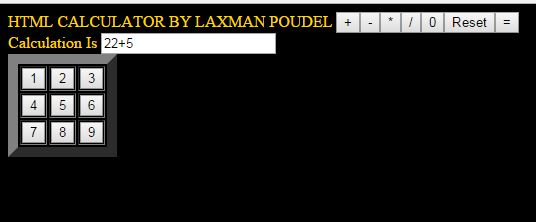
HTML CODE TO CREATE A SIMPLE CALCULATOR

                                            / *PROGRAM BY LAXMAN POUDEL/*
<html>
<head>
<title>HTML CALCULATOR</title>
<p> HTML CALCULATOR BY LAXMAN POUDEL</p>
</head>
<table border="10" width="15">
<body bgcolor= "#000000" text= "gold">
<form name="calculator" >
<tr>
<td><input type="button" value="1" onClick="document.calculator.ans.value+='1'"></td>
<td><input type="button" value="2" onClick="document.calculator.ans.value+='2'"></td>
<td><input type="button" value="3" onClick="document.calculator.ans.value+='3'"></td></tr>
 <input type  ="button" value="+"     onClick="document.calculator.ans.value+='+'">

<tr>
<td><input type="button" value="4" onClick="document.calculator.ans.value+='4'"></td>
<td><input type="button" value="5" onClick="document.calculator.ans.value+='5'"></td>
<td><input type="button" value="6" onClick="document.calculator.ans.value+='6'"></td></tr>
<input type="button" value="-" onClick="document.calculator.ans.value+='-'">

<tr>
<td><input type="button" value="7" onClick="document.calculator.ans.value+='7'">
<td><input type="button" value="8" onClick="document.calculator.ans.value+='8'"></td>
<td><input type="button" value="9" onClick="document.calculator.ans.value+='9'"></td>
<input type="button" value="*" onClick="document.calculator.ans.value+='*'"></td>
<input type="button" value="/" onClick="document.calculator.ans.value+='/'"></tr>

<input type="button" value="0" onClick="document.calculator.ans.value+='0'">
<input type="reset" value="Reset"></td>
<input type="button" value="=" onClick="document.calculator.ans.value=eval(document.calculator.ans.value)">
<br>Calculation Is <input type="textfield" name="ans" value=""></tr>

</form>
</table>
</body>    
</html>                                            OUTPUT WINDOW     


WATCH FULL TUTORIAL TO KNOW HOW TO CREATE HTML CALCULATOR